
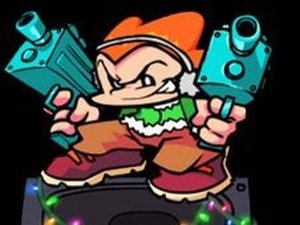
FNF Eggnog Rhythm Challenge
Reviews
FNF Eggnog Rhythm Challenge brings festive cheer with its cheerful holiday theme and classic rhythm gameplay. The inclusion of multiple fan-favorite characters like B3 and Kapi adds variety. The song is catchy and the arrow-matching mechanics are easy to learn. It's a safe, family-friendly experience that spreads joy through music. Great for FNF fans and newcomers alike.
About this game
Game Introduction
FNF Eggnog Rhythm Challenge is a cheerful holiday-themed rhythm game set in the Friday Night Funkin' universe. Players join various fan-favorite characters to sing the classic song 'Eggnog' in a festive setting. The core objective is to follow the rhythm and match on-screen arrow prompts to complete the song successfully. This mod brings together characters like B3, K.O.U, Kapi, and many more, offering a joyful, family-friendly experience that spreads holiday cheer through music and rhythm.
How to Play
In this rhythm game, arrow symbols appear above your character's head in time with the music. Players must press the corresponding arrow keys on their keyboard (up, down, left, right) to match the prompts. The goal is to keep up with the song's rhythm and avoid missing multiple arrows in a row, as too many misses will end the game. Staying focused and practicing your timing are key to completing the song with minimal errors.
Game Features
Festive holiday theme that brings a cheerful atmosphere to the Friday Night Funkin' experience. Includes multiple beloved characters from the FNF universe, such as B3, K.O.U, and Kapi. Core gameplay revolves around rhythmic arrow-matching, a staple of the FNF series. The content is family-friendly and suitable for players of all ages, offering a fun musical challenge without any mature themes.
Tips for Success
Practice regularly to improve your timing and reaction speed. Focus on the rhythm of the song rather than just the visual arrows, as this helps you anticipate the next prompt. Start by playing at a slower pace if the game allows, then gradually increase speed as you become more comfortable. Staying calm and not panicking after a missed note is important—one mistake doesn't mean you'll lose, but consecutive misses will. Finally, familiarize yourself with the song's pattern to better predict upcoming arrows.










Comments
0 comments