
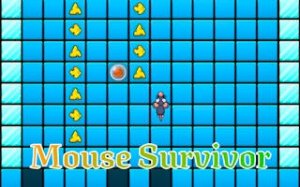
Mouse Runner Adventure Quest
Reviews
Mouse Runner Adventure Quest offers a delightful endless runner experience with procedurally generated levels that keep each playthrough unique. The controls are intuitive on both desktop and mobile, making it accessible for casual players. Collecting cheese and customizing your mouse adds a fun layer of progression. The game is family-friendly and provides a good challenge for those looking to beat their high scores.
About this game
Game Introduction
Mouse Runner Adventure Quest is a family-friendly 2D platformer where players guide a small mouse on an endless journey. The game features procedurally generated tile-based worlds that change as the player moves, ensuring each run is a new experience. The core objective is to run as far as possible while collecting cheese scattered along the path. The game is designed for players of all ages, with simple mechanics that are easy to learn but offer enough challenge to keep experienced players engaged. The focus is on quick reflexes and strategic thinking to navigate the ever-changing landscape and avoid obstacles.
How to Play
Players control the mouse using simple inputs. On desktop, keys such as the arrow keys or spacebar are used to jump and move left or right. Some platforms may require pressing a specific key to handle sudden path changes. On mobile devices, touch and swipe controls provide a seamless experience. The main goal is to keep moving forward, collect as much cheese as possible, and avoid tiles that may disappear when stepped on. On-screen prompts appear when the path shifts, helping players decide their next move.
Game Features
The game offers endless procedural levels, meaning no two runs are the same. Collecting cheese is a key activity, and it may be used for fun customization options to personalize the mouse character. The controls are simple and work on both desktop and mobile devices, making the game easy to pick up and play anytime. As an endless runner, there is no final level, encouraging players to focus on improving their distance and score with each attempt.
Tips for Success
Practice the timing of jumps to avoid disappearing tiles and other hazards. Pay attention to on-screen prompts that signal path changes, as reacting quickly can prevent a fall. Collect every piece of cheese seen, as it may contribute to the score and unlock customization options. Stay focused on the path ahead and try to anticipate obstacles by watching tile patterns. Taking short breaks between runs can help maintain concentration and keep reflexes sharp.








Comments
0 comments